

Everywhere
  • Everywhere
  • Articles
  • Pages
  • Forum
  • Files
  • Records
  • Records
  • Records
  • Records
  • Records
  • Records
  • Records
  • Records
  • Records
  • Recipes
  • Article (Rating System)
  • News
  • News update
  • Videos
  • Images
  • More Options
  1. Forum
  2. News
  3. Hardware
    1. 3D-Accelerator
    2. CPU-Sockets
    3. RAM
    4. HDMI & Display Port
    5. USB
    6. Thunderbolt
    7. Connectors / Ports
  4. Timelines
    1. ICT Timeline
      1. Categories
      2. All Records
      3. ICT Timeline - The Beginnings
      4. ICT Timeline - 60s/70s
      5. ICT Timeline - 80s
      6. ICT Timeline - 90s
      7. ICT Timeline - 00s
      8. ICT Timeline - 10s
    2. OS Timeline
      1. Categories
      2. All Records
      3. DOS
      4. Windows
      5. MacOS
  5. Parcum
    1. Parcum - Map
    2. Parcum - All Entries
    3. Parcum - Countries
    4. Parcum - Categories
  6. Reviews
  7. Rezepte
  8. Other
    1. Downloads
    2. Link-Library
    3. Restaurants, Snacks and more
    4. ISeeT Tools
    5. ISeeT Photos
    6. YouTube Videos
    7. ISeeT TV
    8. ISeeT TV on Tour
  • Login
  • Register
  • Search
  1. ISeeT Forums
  2. Members
  3. ISeeTWizard

Posts by ISeeTWizard

  • Old News deleted

    • ISeeTWizard
    • 10 July 2026 at 12:51

    Old news got deleted from the forum. I just transferred some to the new News area to see how it looks like and the other ones I simply removed.

  • 📢 Important Update: News & Reviews are Getting a New Home!

    • ISeeTWizard
    • 6 July 2026 at 08:35

    Dear Community,

    We have some exciting news regarding the layout and organization of our forum!

    Up until now, all of our News articles and Reviews have been posted as traditional forum entries. While this worked well for a long time, we wanted a cleaner, more professional, and easier-to-browse way to showcase this content.

    🛠️ What is Changing?

    To achieve this, we have integrated two brand-new plugins into the site. Moving forward, News and Reviews will be moved out of the standard forum threads and into their own dedicated, custom-designed sections.

    Note: Everything stays entirely within the forum ecosystem! You won't need to log into an external site or navigate away. They just have their own specialized, beautiful view now, accessible right from the main navigation bar.

    🔗 Explore the New Sections

    You can check out the new systems right now via the main menu, or by using the direct links below:

    • 📰 Our Dedicated News System: forums.iseet.fans/news/
    • ⭐ Our Dedicated Reviews System: forums.iseet.fans/reviews/

    We are currently in the process of organizing this transition, and we hope these dedicated spaces will make reading, finding, and engaging with our major updates and reviews much more enjoyable.

    Thank you for being a part of the community, and let us know what you think of the new look in the comments below! 🙌

    Best regards,

    The Admin Team

  • Activate Office 2024 GVLK with your KMS Server

    • ISeeTWizard
    • 1 July 2026 at 11:25

    I also created a small script to activate Office 2024 GVLK with your KMS server with a better feedback in case of an error or success.


    PowerShell
    # Start the stopwatch at the very beginning
    $Stopwatch = [System.Diagnostics.Stopwatch]::StartNew()
    
    # 1. Enforce PowerShell as Administrator
    if (-not ([Security.Principal.WindowsPrincipal][Security.Principal.WindowsIdentity]::GetCurrent()).IsInRole([Security.Principal.WindowsBuiltInRole]::Administrator)) {
        Write-Error "Please run this PowerShell script as an Administrator!"
        Exit
    }
    
    Write-Host "=== Starting Office KMS Activation ===" -ForegroundColor Cyan
    
    # 2. Locate the Office installation directory dynamically
    $OfficePath = ""
    $PossiblePaths = @(
        "C:\Program Files\Microsoft Office\root\Office16",
        "C:\Program Files\Microsoft Office\Office16",
        "C:\Program Files (x86)\Microsoft Office\root\Office16",
        "C:\Program Files (x86)\Microsoft Office\Office16"
    )
    
    foreach ($Path in $PossiblePaths) {
        if (Test-Path "$Path\ospp.vbs") {
            $OfficePath = $Path
            break
        }
    }
    
    if ([string]::IsNullOrEmpty($OfficePath)) {
        Write-Host "===================================================================" -ForegroundColor Red
        Write-Error "ERROR: ospp.vbs was not found! Is Office actually installed?"
        Write-Host "===================================================================" -ForegroundColor Red
        Exit
    }
    
    Set-Location -Path $OfficePath
    
    # 3. Inject KMS Key and Host Server
    Write-Host "Configuring KMS Client Key and Host..." -ForegroundColor Yellow
    $null = cscript //nologo ospp.vbs /inpkey:XJ2XN-FW8RK-P4HMP-DKDBV-GCVGB
    $null = cscript //nologo ospp.vbs /sethst:your.kms.server
    
    # 4. Trigger KMS Activation
    Write-Host "Activating Office against KMS server..." -ForegroundColor Yellow
    $null = cscript //nologo ospp.vbs /act
    
    # 5. Capture and parse activation status
    Write-Host "Checking activation status..." -ForegroundColor Yellow
    $StatusOutput = cscript //nologo ospp.vbs /dstatus
    
    # Initialize tracking variables
    $IsLicensed = $false
    $IsGrace = $false
    $RemainingDays = ""
    
    foreach ($Line in $StatusOutput) {
        if ($Line -match "LICENSE STATUS:\s+---LICENSED---") {
            $IsLicensed = $true
        }
        elseif ($Line -match "LICENSE STATUS:\s+---OOB_GRACE---|---REMAINING_GRACE---") {
            $IsGrace = $true
        }
        elseif ($Line -match "REMAINING GRACE:\s+(\d+)\s+days") {
            $RemainingDays = $Matches[1]
        }
    }
    
    # Stop the stopwatch right after capturing the status
    $Stopwatch.Stop()
    $ElapsedTime = "{0:mm}m {0:ss}s" -f $Stopwatch.Elapsed
    
    # 6. Big, dumb-user-friendly visual output
    Write-Host ""
    if ($IsLicensed) {
        Write-Host "===================================================================" -ForegroundColor Green
        Write-Host " SUCCESS: Office 2024 is FULLY ACTIVATED and genuine! " -ForegroundColor Green
        Write-Host " Status : LICENSED (180 days standard KMS lease)" -ForegroundColor Green
        Write-Host " Execution Time: $ElapsedTime" -ForegroundColor Green
        Write-Host "===================================================================" -ForegroundColor Green
    }
    elseif ($IsGrace) {
        Write-Host "===================================================================" -ForegroundColor DarkYellow
        Write-Host " WARNING: Office is running in GRACE MODE! " -ForegroundColor DarkYellow
        Write-Host " Status : Temporary Activation " -ForegroundColor DarkYellow
        if ($RemainingDays) {
            Write-Host " Remaining Time: $RemainingDays Days" -ForegroundColor DarkYellow
        }
        Write-Host " Execution Time: $ElapsedTime" -ForegroundColor DarkYellow
        Write-Host "===================================================================" -ForegroundColor DarkYellow
    }
    else {
        Write-Host "===================================================================" -ForegroundColor Red
        Write-Host " ERROR: Office Activation FAILED! " -ForegroundColor Red
        Write-Host " Execution Time: $ElapsedTime" -ForegroundColor Red
        Write-Host "===================================================================" -ForegroundColor Red
        $StatusOutput | Findstr /I "ERROR LICENSE"
    }
    Display More


    Pay attention that you have to adapt the KMS server host in this file!

  • Install Office 2024 GVLK

    • ISeeTWizard
    • 1 July 2026 at 11:22

    Here a small script to install Office 2024 GVLK with different checks during install

    PowerShell
    # Start the stopwatch at the very beginning
    $Stopwatch = [System.Diagnostics.Stopwatch]::StartNew()
    
    # 1. Enforce PowerShell as Administrator
    if (-not ([Security.Principal.WindowsPrincipal][Security.Principal.WindowsIdentity]::GetCurrent()).IsInRole([Security.Principal.WindowsBuiltInRole]::Administrator)) {
        Write-Error "Please run this PowerShell script as an Administrator!"
        Exit
    }
    
    # Dynamically determine the directory where this script is located
    $CurrentDir = $PSScriptRoot
    if ([string]::IsNullOrEmpty($CurrentDir)) { $CurrentDir = Get-Location }
    
    Write-Host "=== Starting Office Installation from $CurrentDir ===" -ForegroundColor Cyan
    
    # 2. Check if setup.exe exists
    if (-not (Test-Path "$CurrentDir\setup.exe")) {
        Write-Error "ERROR: setup.exe was not found in $CurrentDir!"
        Exit
    }
    
    # 3. Check if configuration.xml exists
    $ConfigFile = "$CurrentDir\configuration.xml"
    if (-not (Test-Path $ConfigFile)) {
        Write-Error "ERROR: configuration.xml was not found in $CurrentDir!"
        Exit
    }
    
    # 4. Check if local Office installation source data exists
    $DataFolder = "$CurrentDir\Office\Data"
    if (-not (Test-Path $DataFolder)) {
        Write-Error "ERROR: Local Office installation files are missing!"
        Exit
    }
    
    # 5. Trigger the installation using the local setup.exe
    Write-Host "Starting Office installation in the background..." -ForegroundColor Yellow
    Write-Host "(This might take a few minutes. Do NOT close this window.)" -ForegroundColor DarkGray
    
    $Process = Start-Process -FilePath "$CurrentDir\setup.exe" -ArgumentList "/configure `"$ConfigFile`"" -PassThru
    
    # Give the system 5 seconds to fully spawn the installation window
    Start-Sleep -Seconds 5
    
    # Actively loop and wait ONLY for active installer engines
    Write-Host "Monitoring background installer tasks..." -ForegroundColor DarkGray
    while (Get-Process -Name "setup", "officeinstaller" -ErrorAction SilentlyContinue) {
        Start-Sleep -Seconds 3
    }
    
    # Stop the stopwatch before printing the final banner
    $Stopwatch.Stop()
    $ElapsedTime = "{0:mm}m {0:ss}s" -f $Stopwatch.Elapsed
    
    # 6. Evaluate the final result
    $OfficeCheck1 = Test-Path "C:\Program Files\Microsoft Office\root\Office16\WINWORD.EXE"
    $OfficeCheck2 = Test-Path "C:\Program Files (x86)\Microsoft Office\root\Office16\WINWORD.EXE"
    
    if ($OfficeCheck1 -or $OfficeCheck2) {
        Write-Host ""
        Write-Host "===================================================================" -ForegroundColor Green
        Write-Host " SUCCESS: Office has been successfully installed!" -ForegroundColor Green
        Write-Host " Total Execution Time: $ElapsedTime" -ForegroundColor Green
        Write-Host "===================================================================" -ForegroundColor Green
    } else {
        Write-Host ""
        Write-Host "===================================================================" -ForegroundColor Red
        Write-Host " ERROR: The Office installation process finished, but Office apps"  -ForegroundColor Red
        Write-Host "        could not be found on the system. Please check ODT logs."   -ForegroundColor Red
        Write-Host " Total Execution Time: $ElapsedTime" -ForegroundColor Red
        Write-Host "===================================================================" -ForegroundColor Red
    }
    Display More


    Here is the XML file used for the download and/or installation - name it configuration.xml

    Code
    <Configuration> 
      <Add OfficeClientEdition="64" Channel="PerpetualVL2024"> 
        <Product ID="ProPlus2024Volume" > 
          <Language ID="en-US" /> 
        </Product> 
      </Add> 
      <Display Level="None" AcceptEULA="TRUE" /> 
      <Property Name="AUTOACTIVATE" Value="1" /> 
    </Configuration>
  • Remove Office 365/2024

    • ISeeTWizard
    • 1 July 2026 at 11:20

    Sometimes you have as example Office 365 installed but with several language packs and proofing tools etc. Than it is a pain in the ass to remove every single installation.

    A more fast and smooth way provides this script here

    PowerShell
    # Start the stopwatch at the very beginning
    $Stopwatch = [System.Diagnostics.Stopwatch]::StartNew()
    
    # 1. Enforce PowerShell as Administrator
    if (-not ([Security.Principal.WindowsPrincipal][Security.Principal.WindowsIdentity]::GetCurrent()).IsInRole([Security.Principal.WindowsBuiltInRole]::Administrator)) {
        Write-Error "Please run this PowerShell script as an Administrator!"
        Exit
    }
    
    # Dynamically determine the directory where this script is located
    $CurrentDir = $PSScriptRoot
    if ([string]::IsNullOrEmpty($CurrentDir)) { $CurrentDir = Get-Location }
    
    Write-Host "=== Starting Office Uninstall from $CurrentDir (All Languages) ===" -ForegroundColor Cyan
    
    # 2. Check if setup.exe exists in the current directory
    if (-not (Test-Path "$CurrentDir\setup.exe")) {
        Write-Error "ERROR: setup.exe was not found in $CurrentDir!"
        Exit
    }
    
    # 3. Create the XML configuration file dynamically
    $XmlContent = @"
    <Configuration>
      <Remove All="TRUE">
        <Language ID="all" />
      </Remove>
      <Property Name="FORCEAPPSHUTDOWN" Value="TRUE" />
      <Display Level="None" AcceptEULA="TRUE" />
    </Configuration>
    "@
    
    $XmlFile = "$CurrentDir\uninstall_office.xml"
    $XmlContent | Out-File -FilePath $XmlFile -Encoding ascii
    
    # 4. Trigger the uninstallation
    Write-Host "Uninstalling Office in the background. Please wait..." -ForegroundColor Yellow
    Write-Host "(Any open Office applications will be closed automatically.)" -ForegroundColor DarkGray
    
    $Process = Start-Process -FilePath "$CurrentDir\setup.exe" -ArgumentList "/configure `"$XmlFile`"" -Wait -PassThru
    
    # Stop the stopwatch before printing the final banner
    $Stopwatch.Stop()
    $ElapsedTime = "{0:mm}m {0:ss}s" -f $Stopwatch.Elapsed
    
    # 5. Evaluate the result and Exit Code
    if ($Process.ExitCode -eq 0) {
        Write-Host ""
        Write-Host "===================================================================" -ForegroundColor Green
        Write-Host " SUCCESS: Office and all language packs have been removed! " -ForegroundColor Green
        Write-Host " Total Execution Time: $ElapsedTime" -ForegroundColor Green
        Write-Host "===================================================================" -ForegroundColor Green
        Remove-Item -Force $XmlFile -ErrorAction SilentlyContinue
    } else {
        Remove-Item -Force $XmlFile -ErrorAction SilentlyContinue
    
        $OfficeService = Get-Service -Name "ClickToRunSvc" -ErrorAction SilentlyContinue
        $OfficeRegistry = Test-Path "HKLM:\SOFTWARE\Microsoft\Office\ClickToRun"
    
        if (-not $OfficeService -and -not $OfficeRegistry) {
            Write-Host ""
            Write-Host "Notice: No installed Office product was detected on this system." -ForegroundColor DarkYellow
            Write-Host "The uninstallation process has been skipped." -ForegroundColor DarkYellow
            Write-Host "Total Execution Time: $ElapsedTime" -ForegroundColor DarkYellow
        } else {
            Write-Error "An error occurred during the Office uninstallation. ExitCode: $($Process.ExitCode)"
            Write-Host "Total Execution Time: $ElapsedTime" -ForegroundColor Red
        }
    }
    Display More
  • Recipes

    • ISeeTWizard
    • 30 June 2026 at 07:46

    The recipes area is now open but pay attention that most of the recipes will be in German (some may be in French) and not in English!
    I live in Luxembourg and so German or French is more convenient for recipes for me.

    Simply use a translator tool or ask if you need to have more info :smiling_face:

  • MacOS - Duplicate Icons after restore

    • ISeeTWizard
    • 17 June 2026 at 13:11

    Sometimes it may happen that after you reinstall your Mac but don't recover a backup icons suddenly 2-3 times.
    This is a known bug and can easily be fixed with a simple command.

    Open the Terminal app and enter this

    Code
    defaults write com.apple.dock ResetLaunchPad -bool true; killall Dock

    If this doesn't directly work you may switch off your Mac (REALLY SWITCH OFF) and wait for about 30 seconds. Than you can switch on again.

    If that doesn't help you may really have multiple copies of the apps in your application folder.

  • Microsoft

    • ISeeTWizard
    • 20 May 2026 at 10:23

    Microsoft is a global technology company specializing in software, hardware, cloud services, and digital technologies, headquartered in Redmond. The company is best known for products such as Windows, Microsoft Office, and cloud platforms like Azure. It has grown into one of the world’s largest technology companies and software developers.

    Microsoft was founded on April 4, 1975, in Albuquerque by [definition='4','0']Bill Gates[/definition] and Paul Allen. The company later moved to Bellevue and eventually established its headquarters in Redmond. The name Microsoft combines the words microcomputer and software.

    Microsoft’s early success came from developing a BASIC interpreter, followed by the release of MS-DOS in 1981 for IBM-compatible PCs. During the 1990s, Windows and Microsoft Office became dominant products in the personal computer market, helping establish Microsoft as a leading force in the technology industry.

    Leadership evolved over time, with Steve Ballmer serving as CEO from 2000 to 2014, followed by Satya Nadella, who has led the company since 2014 and overseen a major expansion into cloud computing and artificial intelligence.

  • Active Directory

    • ISeeTWizard
    • 20 May 2026 at 10:22

    Active Directory (AD) is the directory service used in Microsoft Windows Server environments to centrally manage users, devices, permissions, and network resources. Starting with Windows Server 2008, its core functionality became known as Active Directory Domain Services (AD DS).

    A directory service works similarly to a digital phone book, storing and organizing information about network objects and their relationships. These objects can include:

    • Users – employee accounts and login credentials
    • Groups – collections of users with shared permissions
    • Computers and servers – devices connected to the network
    • Printers, scanners, and shared folders – accessible resources
    • Services and applications – systems requiring authentication

    Active Directory allows organizations to structure networks according to their business hierarchy or physical locations, making administration more efficient. Administrators can create policies, assign permissions, and monitor resources from a central location.

    One of AD’s key functions is access control. For example, administrators can decide which users may access certain files, applications, or printers, ensuring security and restricting sensitive information to authorized personnel only. This centralized authentication and authorization model is a core reason why Active Directory remains widely used in enterprise IT environments.

  • Windows

    • ISeeTWizard
    • 20 May 2026 at 10:21

    Microsoft Windows, commonly known as Windows, began as a graphical user interface developed by Microsoft to run on top of MS-DOS. Over time, it evolved into a family of standalone operating systems and became one of the most widely used platforms for personal computers worldwide.

    Early versions of Windows functioned as graphical extensions to DOS, similar to systems such as GEM or PC/GEOS. Starting with Windows 95, Microsoft introduced major improvements including a redesigned kernel, the 32-bit Win32 API, and built-in internet support. These systems, including Windows 98 and Windows ME, became known collectively as the Windows 9x family.

    At the same time, Microsoft developed Windows NT, led by David Cutler and based on concepts from the VMS operating system. Because of its greater stability and technical capabilities, Windows NT eventually replaced Windows 9x. Since Windows XP, all desktop versions of Windows have been built on the Windows NT architecture.

    Today, Windows powers a wide range of devices including desktop PCs, laptops, servers, embedded systems, retail terminals, industrial equipment, and specialized automotive systems. The name Windows comes from the graphical interface design, where applications appear as rectangular “windows” on the screen.

  • Bill Gates

    • ISeeTWizard
    • 20 May 2026 at 10:20

    [definition='4','0']Bill Gates[/definition] is an American entrepreneur, programmer, and philanthropist best known for co-founding Microsoft with Paul Allen in 1975. His role in building Microsoft helped make him one of the wealthiest individuals in the world, with an estimated fortune exceeding $100 billion.

    In 2008, Gates stepped away from Microsoft’s day-to-day operations to focus primarily on philanthropy through the Bill & Melinda Gates Foundation, which he co-founded. Through initiatives such as the The Giving Pledge, he committed to donating the majority of his wealth and had already contributed tens of billions of dollars to charitable causes. Gates has pledged to give away 95% of his fortune during his lifetime, concentrating on global health, education, and poverty reduction.

  • Paul Allen

    • ISeeTWizard
    • 20 May 2026 at 10:19

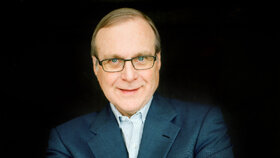
    Paul Allen was an American entrepreneur best known for co-founding Microsoft with [definition='4','0']Bill Gates[/definition]. He served on the company’s board from 1975 to 1983 before focusing on business investments, art collecting, and ownership of professional sports teams in North America.

    Allen was widely regarded as a visionary of the connected digital world, recognizing early the importance of networked technologies. In 2015, he was ranked among the world’s wealthiest individuals by Forbes, with an estimated net worth of $17.5 billion, placing him 51st globally. Beyond technology, he became known for philanthropy, scientific projects, and support for sports and the arts.

  • Disk Operating System

    • ISeeTWizard
    • 20 May 2026 at 10:18

    A Disk Operating System (DOS) refers to an operating system primarily designed to manage data stored as files on rotating storage devices such as floppy disks and hard drives. Its main purpose is organizing, accessing, and controlling stored information.

    Today, the term DOS is used almost exclusively as a synonym for MS-DOS, the operating system that dominated personal computing and was one of the most widely used systems until the late 1990s.

  • Personal Computer

    • ISeeTWizard
    • 20 May 2026 at 10:17

    A personal computer (PC) is a versatile computer designed for everyday individual use. Unlike earlier computers, which were mainly operated by experts, technicians, or scientists, PCs made computing accessible to the general public. The concept emerged in the 1970s and was driven by hacker culture, with affordable pricing and ease of use becoming key factors in its success. Since the first implementations in 1976, PCs have played a major role in what many describe as the computer revolution.

    PCs are microcomputers, differing from larger systems such as minicomputers or mainframes. They appear in forms including desktops, laptops, and tablets, and can run operating systems like Windows, macOS, Android, or Unix. Their use ranges from home computing to professional workstations, with high-performance workstations designed for demanding computing tasks.

    Although the term “personal computer” existed earlier, from 1981 onward the abbreviation “PC” became strongly associated with the IBM PC and compatible systems. This connection was reinforced by IBM’s marketing and linked to x86 processors and operating systems such as DOS and Windows. In some cases, “PC” is still associated specifically with traditional x86 desktop computers, despite newer PC formats such as tablet devices.

  • Hard Disk Drive

    • ISeeTWizard
    • 20 May 2026 at 10:14

    A hard disk drive (HDD), hard disk, hard drive, or fixed disk[b] is an electro-mechanical data storage device that stores and retrieves digital data using magnetic storage and one or more rigid rapidly rotating platters coated with magnetic material. The platters are paired with magnetic heads, usually arranged on a moving actuator arm, which read and write data to the platter surfaces. Data is accessed in a random-access manner, meaning that individual blocks of data can be stored and retrieved in any order. HDDs are a type of non-volatile storage, retaining stored data even when powered off. Modern HDDs are typically in the form of a small rectangular box.

    Introduced by IBM in 1956, HDDs were the dominant secondary storage device for general-purpose computers beginning in the early 1960s. HDDs maintained this position into the modern era of servers and personal computers, though personal computing devices produced in large volume, like cell phones and tablets, rely on flash memory storage devices. More than 224 companies have produced HDDs historically, though after extensive industry consolidation most units are manufactured by Seagate, Toshiba, and Western Digital. HDDs dominate the volume of storage produced (exabytes per year) for servers. Though production is growing slowly (by exabytes shipped), sales revenues and unit shipments are declining because solid-state drives (SSDs) have higher data-transfer rates, higher areal storage density, somewhat better reliability, and much lower latency and access times.

    The revenues for SSDs, most of which use NAND flash memory, slightly exceed those for HDDs. Flash storage products had more than twice the revenue of hard disk drives as of 2017. Though SSDs have four to nine times higher cost per bit, they are replacing HDDs in applications where speed, power consumption, small size, high capacity and durability are important. Cost per bit for SSDs is falling, and the price premium over HDDs has narrowed.

    The primary characteristics of an HDD are its capacity and performance. Capacity is specified in unit prefixes corresponding to powers of 1000: a 1-terabyte (TB) drive has a capacity of 1,000 gigabytes (GB; where 1 gigabyte = 1 billion (109) bytes). Typically, some of an HDD's capacity is unavailable to the user because it is used by the file system and the computer operating system, and possibly inbuilt redundancy for error correction and recovery. Also there is confusion regarding storage capacity, since capacities are stated in decimal gigabytes (powers of 1000) by HDD manufacturers, whereas the most commonly used operating systems report capacities in powers of 1024, which results in a smaller number than advertised. Performance is specified by the time required to move the heads to a track or cylinder (average access time) adding the time it takes for the desired sector to move under the head (average latency, which is a function of the physical rotational speed in revolutions per minute), and finally the speed at which the data is transmitted (data rate).

    The two most common form factors for modern HDDs are 3.5-inch, for desktop computers, and 2.5-inch, primarily for laptops. HDDs are connected to systems by standard interface cables such as PATA (Parallel ATA), SATA (Serial ATA), USB or SAS (Serial Attached SCSI) cables.

  • Gaming

    • ISeeTWizard
    • 20 May 2026 at 10:07

    Gaming is the practice of playing video games. The term may also refer to betting, especially online. This article focuses just on the term when it refers to video games.

    Somebody who is gaming may be playing video or electronic games using a console, mobile phone, VR (virtual reality) goggles, or computer. The gamer is typically a regular player who enjoys electronic games as a hobby. There are also professional gamers; they make a living in the world of esports. In fact, some of them are now millionaires.

    The term esports is short for electronic sports, in which gamers compete online or in giant arenas. Prize money sizes have been increasing dramatically over the past few years.

  • Eliza 8086 a.s.b.l. - Info

    • ISeeTWizard
    • 19 May 2026 at 14:49

    Intro

    Nu räichlecher Iwwerleeung an nodeems ech nu x Méint nach ëmmer net vun der Gemeng um Site vun den Associatiounen erwäänt ginn hunn ech Entscheedung getraff Eliza an ISeeT ze integréieren an net mei als eegestännege Projet lafen ze loossen.

    Da een hei an der Péitenger Gemenger nëmmen eppes kritt wann een CSV Parteikaart huet an ech dat Spillchen net mat maache leeft et elo eben esou a wann ech eppes organiséiere well wei z.B. een Themenowend iwwert Internet Sécherheet oder een Ausfluch ob eng Convention oder an ee Musée dann halt eben ouni eis wonnerbar (net) Gemeng.


    Ären perseinlechen Computer Club

    Mir hunn dëse Club gegrënnt well et net genuch Informatiounen an Treffe gëtt fir Leit a Punkto Computer, allgemeng EDV oder virun allem iwwer Computer an Internet Sécherheet ze beroden oder informéieren.

    Och wann et BeeSecure zum Beispill gëtt oder ee Rentner Club deen anere Rentner hëlleft, geet et an der haiteger Zäit bei wäitem nach net duer.

    Mir hunn déi lescht Wochen a Méint esou villes an eisem Ëmfeld gesinn a gelies dass mir eis eben zu dem Schratt duerchgeronge hunn a mir hunn nach relativ vill Iddie wat mer eventuell soss nach maache kéinten.

    Momentan ass Säit (Eliza Deel) nëmmen ob lëtzebuergesch a kennt och eventuell spéider mol franséisch eraus. De Problem ass dass et deier kascht (finanziell an Zäitopwand) ee Site Multilingual opzebauen. Jee nu Demande an aktive Memberszuelen ännert sech dat also villäicht.


    Waat ass "Eliza"

    ELIZA ass e vum Joseph Weizenbaum am Joer 1966 entwéckelte Computerprogramm, dee geduecht ass fir d'Méiglechkeete vun der Kommunikatioun tëscht engem Mënsch an engem Computer mat der natierlecher Sprooch ze demonstréieren.

    De Weizenbaum huet den Numm ELIZA gewielt op Basis vum Spill Pygmalion vum George Bernard Shaw. De Programm ka verschidde Gespréichspartner mat Skripte simuléieren. Et ass bekannt gi fir déi iwwerflächlech Simulatioun vun engem Psychotherapeut, deen d'net-direktive Methode vun der Client-zentréierter Psychotherapie no Carl Rogers benotzt.

    De Weizenbaum huet de Programm am MAD-SLIP fir en IBM 7094 geschriwwen, deen den CTSS Time-Sharing System vum Massachusetts Institute of Technology benotzt huet.

    ELIZA kann als fréi Ëmsetzung vum Turing Test gesi ginn. Dësen Test huet en awer net gepackt well e Benotzer einfach erausfanne kann datt se mat enger Maschinn kommunizéiert.

    Hei de Link ob Wikipedia


    Waat bidden mer?

    Iwwert Zäit wëlle mer Follgendes ubidden

    • Berodung ronderëm EDV asw.
    • Bedreiwe vun dëser Websäit mat Sammlung vun Informatioune ronderëm EDV, Internet an hier Sécherheet.
    • Austausch vun Informatiounen ob geleeëntlechen Treffe respektiv am Virfeld ausgemaachte Terminer fir zum Beispill eng Kafberodung.
    • An Zukunft komme villäicht nach Servicer dobäi - déi ginn hei dann och ugekënnegt.


    Eis Projeten

    Folgend Projeten versichen mer emzesetzen falls et eis Meiglech ass

    • Mir wollte kucke fir ee Meeting 1-2 mol de Mound ze maache wou mer Leit ënnerstëtze mat hiren IT Problemer.
    • Mir versiche villäicht déi eng oder aner Rees ob eng Convention respektiv an e Musée ze organiséieren.
    • Falls ee Späicherplaz fir eng Websäit brauch kenne mer och eventuell hëllefe je nu Quantitéit déi gebraucht gëtt
    • Iwwert den ISeeT TV YouTube Channel huele mer déi eng oder aner Schoulung ob.
    • Mir loossen alles ob a kucke wat ee soss eventuell kann ëmsetzen oder och net.


    Fazit

    Zefridde Computer Notzer sinn eis Ziel!
    Mir hoffen sou villen Leit wei méiglech kenne mat eisen Infoen a Berodungen ze hëllefen.

  • Hardware

    • ISeeTWizard
    • 19 May 2026 at 14:48

    A simple definition of computer hardware is “any physical parts or components that contribute to a computer system.” There are several different kinds of hardware inside a PC. Both desktop and laptop PCs include these types of hardware, though the size and type differ because of a laptop’s compact design.

    Think of computer hardware as the parts of your computer that you can see and touch. These are the tangible components that are likely fitted together inside your computer case and installed with a screwdriver.

    So computer hardware includes the physical parts of a computer, such as the central processing unit (CPU), random access memory (RAM), motherboard, computer data storage, graphics card, sound card, and computer case. It includes external devices such as a monitor, mouse, keyboard, and speakers.

    By contrast, software is the set of instructions that can be stored and run by hardware. Hardware is so-termed because it is hard or rigid with respect to changes, whereas software is soft because it is easy to change.

    Hardware is typically directed by the software to execute any command or instruction. A combination of hardware and software forms a usable computing system, although other systems exist with only hardware.

  • Software

    • ISeeTWizard
    • 19 May 2026 at 13:51

    Software is a collection of programs and data that tell a computer how to perform specific tasks. Software often includes associated software documentation. This is in contrast to hardware, from which the system is built and which actually performs the work.

    At the lowest programming level, executable code consists of machine language instructions supported by an individual processor—typically a central processing unit (CPU) or a graphics processing unit (GPU). Machine language consists of groups of binary values signifying processor instructions that change the state of the computer from its preceding state. For example, an instruction may change the value stored in a particular storage location in the computer—an effect that is not directly observable to the user. An instruction may also invoke one of many input or output operations, for example, displaying some text on a computer screen, causing state changes that should be visible to the user. The processor executes the instructions in the order they are provided, unless it is instructed to "jump" to a different instruction or is interrupted by the operating system. As of 2024, most personal computers, smartphone devices, and servers have processors with multiple execution units, or multiple processors performing computation together, so computing has become a much more concurrent activity than in the past.

    The majority of software is written in high-level programming languages. They are easier and more efficient for programmers because they are closer to natural languages than machine languages. High-level languages are translated into machine language using a compiler, an interpreter, or a combination of the two. Software may also be written in a low-level assembly language that has a strong correspondence to the computer's machine language instructions and is translated into machine language using an assembler.

  • Slow Windows?

    • ISeeTWizard
    • 13 April 2026 at 08:49

    Over the time your Windows might get slow and this not due to the system in itself but simply maybe because the TRIM isn't executed on your System.

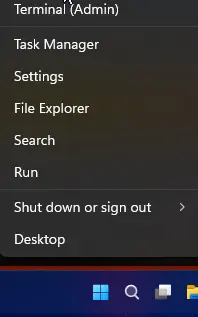
    You can check this by right clicking the start menu and than choose "Terminal (Admin)"

    First you gonna do a speed test with the following command and result:

    Code
    winsat disk -drive c
    
    
    !!! THIS IS THE RESULT YOU'LL SEE !!!


    Windows System Assessment Tool
    > Running: Feature Enumeration ''
    > Run Time 00:00:00.00
    > Running: Storage Assessment '-drive c -ran -read'
    > Run Time 00:00:00.44
    > Running: Storage Assessment '-drive c -seq -read'
    > Run Time 00:00:04.72
    > Running: Storage Assessment '-drive c -seq -write'
    > Run Time 00:00:02.50
    > Running: Storage Assessment '-drive c -flush -seq'
    > Run Time 00:00:00.63
    > Running: Storage Assessment '-drive c -flush -ran'
    > Run Time 00:00:00.53
    > Dshow Video Encode Time                      0.00000 s
    > Dshow Video Decode Time                      0.00000 s
    > Media Foundation Decode Time                 0.00000 s
    > Disk  Random 16.0 Read                       751.09 MB/s          8.5
    > Disk  Sequential 64.0 Read                   2611.83 MB/s          9.2
    > Disk  Sequential 64.0 Write                  2139.40 MB/s          9.1
    > Average Read Time with Sequential Writes     0.059 ms          8.9
    > Latency: 95th Percentile                     0.145 ms          8.9
    > Latency: Maximum                             0.550 ms          8.9
    > Average Read Time with Random Writes         0.052 ms          8.9
    > Total Run Time 00:00:08.94
    Display More

    Important in the result are the Disk Sequential 64 Read and Write.

    Now you execute this command here:

    Code
    defrag /O c:
    
    
    !!! THIS IS THE RESULT YOU'LL SEE !!!
    
    Invoking retrim on Windows (C:)...
    
    
    The operation completed successfully.
    
    Post Defragmentation Report:
    
            Volume Information:
                    Volume size                 = 476,47 GB
                    Free space                  = 244,79 GB
    
            Retrim:
                    Total space trimmed         = 248,31 GB
    Display More

    The result can take some seconds as also some minutes.

    This will force a retrim on your SSD! - PAY ATTENTION: Never let run a normal defrag on a SSD as you will reduce his lifetime with that!

    Now execute the first command again and compare the Disk Sequential Values with each other.

    In my case they were nearly the same on the one machine and on another about 300MB/s in difference. If they are nearly the same this is good as this normally means that your TRIM is working correctly.

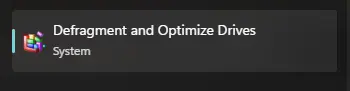
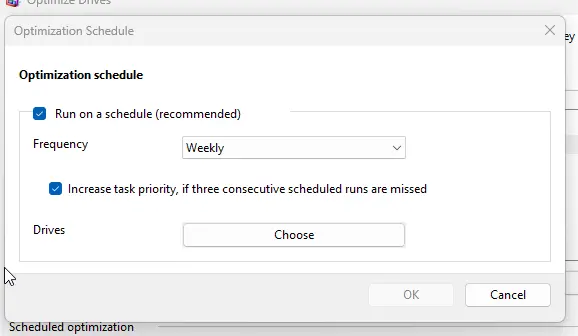
    Microsoft Windows defrag has this integrated and you can schedule this execution on a regular basis (weekly).
    Search defrag and optimization in the start menu:

    Check on the bottom here if the scheduled optimization are active or not:

    If you click on change settings you should see this:

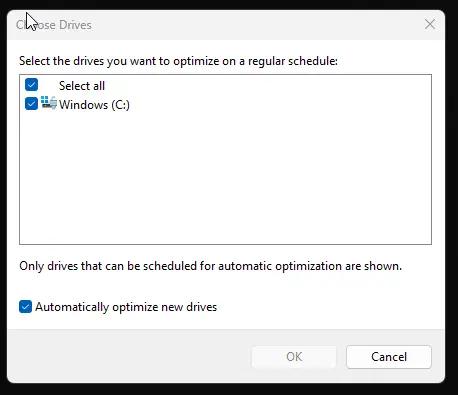
    And under Drives you click Choose to check if your SSD is also checked:

    Sometimes the schedule is active but the disc isn't activated.

  • Diamond Painting - Dark Cat - Aldi Luxembourg

    • ISeeTWizard
    • 30 March 2026 at 12:29
    Rating
    3.7/5
    Good

    I bought a diamond painting canvas (size 30cm x 30cm) from Home Creation in an Aldi shop here in Luxembourg.

    This is the first one I'm doing and I'm pretty satisfied with the result. Unfortunately you also see that the price for 4,99€ isn't too cheap. The diamonds are horribly irregular, the bigger diamonds used are too big and so it doesn't look that well and there are transparent ones, where you could have put a reflective surface on the ground, like for the bigger ones (which were heavily scratched), where the number 6 shines trough and that in even bigger as the diamond functions as a magnifying glass.

    So over all I'm happy with the result but I also see why they are so cheap. So the next one will be more expensive.

    Positive
    Negative
    • Price (only 4,99€)
    • Canvas choice


    • Scratches on the diamonds
    • A very tight calculation number of diamonds
    • Some diamonds are too big
    • Transparent diamonds are like a magnifying glass and so the number shines trough
    • No hanging option
  • Add "Take Ownership" to the context menu

    • ISeeTWizard
    • 18 March 2026 at 13:56
    Code
    Windows Registry Editor Version 5.00
    
    [-HKEY_CLASSES_ROOT\*\shell\TakeOwnership]
    [-HKEY_CLASSES_ROOT\*\shell\runas]
    
    [HKEY_CLASSES_ROOT\*\shell\TakeOwnership]
    @="Take Ownership"
    "Extended"=-
    "HasLUAShield"=""
    "NoWorkingDirectory"=""
    "NeverDefault"=""
    
    [HKEY_CLASSES_ROOT\*\shell\TakeOwnership\command]
    @="powershell -windowstyle hidden -command \"Start-Process cmd -ArgumentList '/c takeown /f \\\"%1\\\" && icacls \\\"%1\\\" /grant *S-1-3-4:F /t /c /l' -Verb runAs\""
    "IsolatedCommand"= "powershell -windowstyle hidden -command \"Start-Process cmd -ArgumentList '/c takeown /f \\\"%1\\\" && icacls \\\"%1\\\" /grant *S-1-3-4:F /t /c /l' -Verb runAs\""
    
    
    [HKEY_CLASSES_ROOT\Directory\shell\TakeOwnership]
    @="Take Ownership"
    "AppliesTo"="NOT (System.ItemPathDisplay:=\"C:\\Users\" OR System.ItemPathDisplay:=\"C:\\ProgramData\" OR System.ItemPathDisplay:=\"C:\\Windows\" OR System.ItemPathDisplay:=\"C:\\Windows\\System32\" OR System.ItemPathDisplay:=\"C:\\Program Files\" OR System.ItemPathDisplay:=\"C:\\Program Files (x86)\")"
    "Extended"=-
    "HasLUAShield"=""
    "NoWorkingDirectory"=""
    "Position"="middle"
    
    [HKEY_CLASSES_ROOT\Directory\shell\TakeOwnership\command]
    @="powershell -windowstyle hidden -command \"$Y = ($null | choice).Substring(1,1); Start-Process cmd -ArgumentList ('/c takeown /f \\\"%1\\\" /r /d ' + $Y + ' && icacls \\\"%1\\\" /grant *S-1-3-4:F /t /c /l /q') -Verb runAs\""
    "IsolatedCommand"="powershell -windowstyle hidden -command \"$Y = ($null | choice).Substring(1,1); Start-Process cmd -ArgumentList ('/c takeown /f \\\"%1\\\" /r /d ' + $Y + ' && icacls \\\"%1\\\" /grant *S-1-3-4:F /t /c /l /q') -Verb runAs\""


    [HKEY_CLASSES_ROOT\Drive\shell\runas]
    @="Take Ownership"
    "Extended"=-
    "HasLUAShield"=""
    "NoWorkingDirectory"=""
    "Position"="middle"
    "AppliesTo"="NOT (System.ItemPathDisplay:=\"C:\\\")"
    
    [HKEY_CLASSES_ROOT\Drive\shell\runas\command]
    @="cmd.exe /c takeown /f \"%1\\\" /r /d y && icacls \"%1\\\" /grant *S-1-3-4:F /t /c"
    "IsolatedCommand"="cmd.exe /c takeown /f \"%1\\\" /r /d y && icacls \"%1\\\" /grant *S-1-3-4:F /t /c"
    Display More
  • Expiring Secure Boot certificates in June 2026

    • ISeeTWizard
    • 9 March 2026 at 10:14

    Windows Secure Boot certificates are reaching their "End of Life" starting June 2026. If you haven't updated your UEFI CA certificates, your PC's boot-level security is about to expire.

    To check if you already have these new certificates (normally this isn't the case if your machine has more than 2 years) you can use a simply PowerShell command (run as administrator)

    PowerShell
    [System.Text.Encoding]::ASCII.GetString((Get-SecureBootUEFI db).bytes) -match 'Windows UEFI CA 2023'

    If this returns true your system is up to date but if it returns false you have to update it.

    If you get a variable not found or similar you don't have Secure Boot activated in the BIOS which is very bad for Windows 11.

    To enforce the update you can do the following, also again in PowerShell as administrator.

    PowerShell
    reg add HKEY_LOCAL_MACHINE\SYSTEM\CurrentControlSet\Control\Secureboot /v AvailableUpdates /t REG_DWORD /d 0x5944 /f
    
    Start-ScheduledTask -TaskName "\Microsoft\Windows\PI\Secure-Boot-Update"

    After that you should reboot.

    If you now check with the first command you should get a true.

    Now to be sure that the system takes over the new certificates you should reboot a second time and you are ready to go and you are again on a more secure side.

  • Disable Bing search

    • ISeeTWizard
    • 9 January 2026 at 13:47
    Code
    Windows Registry Editor Version 5.00
    
    [HKEY_LOCAL_MACHINE\SOFTWARE\Microsoft\Windows\CurrentVersion\Search]
    "BingSearchEnabled"=dword:00000000
  • Add permanent delete to the shell menu

    • ISeeTWizard
    • 9 January 2026 at 13:46
    Code
    Windows Registry Editor Version 5.00
    
    [HKEY_CLASSES_ROOT\AllFilesystemObjects\shell\PermanentDelete]
    "ExplorerCommandHandler"="{E9571AB2-AD92-4ec6-8924-4E5AD33790F5}"
    "Icon"="%windir%\\System32\\shell32.dll,-240"
    "Position"="Bottom" 

Latest Posts

  1. Old News deleted

    ISeeTWizard
    10 July 2026 at 12:51
  2. 📢 Important Update: News & Reviews are Getting a New Home!

    ISeeTWizard
    6 July 2026 at 08:35
  3. Activate Office 2024 GVLK with your KMS Server

    ISeeTWizard
    1 July 2026 at 11:25
  4. Install Office 2024 GVLK

    ISeeTWizard
    1 July 2026 at 11:22
  5. Remove Office 365/2024

    ISeeTWizard
    1 July 2026 at 11:20

Did you know…?

“We are here to add what we can to life, not to get what we can from life.”

William Osler

“Live in the sunshine, swim the sea, drink the wild air.”

Ralph Waldo Emerson

“Life is made of ever so many partings welded together.”

Charles Dickens

“Whatever we are, whatever we make of ourselves, is all we will ever have—and that, in its profound simplicity, is the meaning of life.”

Philip Appleman

“I may not have gone where I intended to go, but I think I have ended up where I needed to be.”

Douglas Adams

“Don’t take yourself too seriously. Know when to laugh at yourself, and find a way to laugh at obstacles that inevitably present themselves.”

Halle Bailey

“When you have a dream, you’ve got to grab it and never let go.”

Carol Burnett

“In three words I can sum up everything I’ve learned about life: It goes on.”

Robert Frost

“You can’t help what you feel, but you can help how you behave.”

Margaret Atwood

“The simple things are also the most extraordinary things, and only the wise can see them.”

Paulo Coelho

“Be where you are; otherwise you will miss your life.”

Buddha

“The fear of death follows from the fear of life. A man who lives fully is prepared to die at any time.”

Mark Twain

“If you don’t have any shadows, you’re not in the light.”

Lady Gaga

“For me, becoming isn’t about arriving somewhere or achieving a certain aim. I see it instead as forward motion, a means of evolving, a way to reach continuously toward a better self. The journey doesn’t end.”

Michelle Obama

“Some people want it to happen, some wish it would happen, others make it happen.”

Michael Jordan

“All dreams are within reach. All you have to do is keep moving towards them.”

Viola Davis

“Let us make our future now, and let us make our dreams tomorrow’s reality.”

Malala Yousafzai

“Tomorrow is a new day. You shall begin it serenely and with too high a spirit to be encumbered with your old nonsense.”

Ralph Waldo Emerson

“No need to hurry. No need to sparkle. No need to be anybody but oneself.”

Virginia Woolf

“Don’t judge each day by the harvest you reap but by the seeds that you plant.”

Robert Louis Stevenson

“I’m not going to continue knocking on that old door that doesn’t open for me. I’m going to create my own door and walk through that.”

W.P. Kinsella

“Always remember that you are absolutely unique. Just like everyone else.”

Margaret Mead

“One of the deep secrets of life is that all that is really worth doing is what we do for others.”

Lewis Carroll

“We must let go of the life we have planned, so as to accept the one that is waiting for us.”

Joseph Campbell

“You only live once, but if you do it right, once is enough.”

Mae West

“Be persistent and never give up hope.”

George Lucas

“You may not control all the events that happen to you, but you can decide not to be reduced by them.”

Maya Angelou

“You don’t always need a plan. Sometimes you just need to breathe, trust, let go and see what happens.”

Mandy Hale

“Find out who you are and do it on purpose.”

Dolly Parton

“If you live long enough, you’ll make mistakes. But if you learn from them, you’ll be a better person.”

Bill Clinton

“Everything you can imagine is real.”

Pablo Picasso

“Life has no limitations, except the ones you make.”

Les Brown

“To succeed in life, you need three things: a wishbone, a backbone, and a funnybone.”

Reba McEntire

“Always do your best. What you plant now, you will harvest later.”

Og Mandino

“If you have knowledge, let others light their candles in it.”

Margaret Fuller

“We have to dare to be ourselves, however frightening or strange that self may prove to be.”

May Sarton

“Nothing is impossible. The word itself says ‘I’m possible!’”

Audrey Hepburn

“If you don’t like the road you’re walking, start paving another one.”

Dolly Parton

“It is better to fail in originality than to succeed in imitation.”

Herman Melville

“When I let go of what I am, I become what I might be.”

Lao Tzu

“Don’t worry about failure, you only have to be right once.”

Drew Houston

“Do one thing every day that scares you.”

Eleanor Roosevelt

“I’m not going to continue knocking that old door that doesn’t open for me. I’m going to create my own door and walk through that.”

Ava DuVernay

“We pass through this world but once.”

Stephen Jay Gould

“Be yourself; everyone else is already taken.”

Oscar Wilde

“Life is very interesting…in the end, some of your greatest pains become your greatest strengths.”

Drew Barrymore

“Life is a daring adventure or it is nothing at all.”

Helen Keller

“There’s love enough in this world for everybody, if people will just look.”

Kurt Vonnegut

“The future belongs to those who prepare for it today.”

Malcolm X

“Spread love everywhere you go. Let no one ever come without leaving happier.”

Mother Teresa

“Once you face your fear, nothing is ever as hard as you think.”

Olivia Newton-John

“There are so many great things in life; why dwell on negativity?”

Zendaya

“There are no regrets in life. Just lessons.”

Jennifer Aniston

“I believe that if you’ll just stand up and go, life will open up for you. Something just motivates you to keep moving.”

Tina Turner

“You have to believe in yourself when no one else does.”

Serena Williams

“The new dawn blooms as we free it. For there is always light if only we’re brave enough to see it, if only we’re brave enough to be it.”

Amanda Gorman

“Before anything else, preparation is the key to success.”

Alexander Graham Bell

“Life is like riding a bicycle. To keep your balance, you must keep moving.”

Albert Einstein

“We make a living by what we get, but we make a life by what we give.”

Winston Churchill

“Coming together is a beginning; keeping together is progress; working together is success.”

Henry Ford

“Be sure you put your feet in the right place, then stand firm.”

Abraham Lincoln

“Life isn’t about finding yourself. Life is about creating yourself.”

George Bernard Shaw

“It is better to be hated for what you are than to be loved for what you are not.”

Andre Gide

“Failure is a great teacher and, if you are open to it, every mistake has a lesson to offer.”

Oprah Winfrey

“Never let the fear of striking out keep you from playing the game.”

Babe Ruth

“The purpose of life is to live it, to taste experience to the utmost, to reach out eagerly and without fear for newer and richer experience.”

Eleanor Roosevelt

“Dreaming, after all, is a form of planning.”

Gloria Steinem

“Just when you think it can’t get any worse, it can. And just when you think it can’t get any better, it can.”

Nicholas Sparks

“Success is stumbling from failure to failure with no loss of enthusiasm.”

Winston Churchill

“For the great doesn’t happen through impulse alone, and is a succession of little things that are brought together.”

Vincent Van Gogh

“It does not matter how slowly you go, as long as you do not stop.”

Confucius

“The great courageous act that we must all do is to have the courage to step out of our history and past so that we can live our dreams.”

Oprah Winfrey

“Good friends, good books, and a sleepy conscience: This is the ideal life.”

Mark Twain

“There is no perfection, only life.”

Milan Kundera

“Life is what happens to you when you are busy making other plans.”

John Lennon

“Always go with your passions. Never ask yourself if it’s realistic or not.”

Deepak Chopra

“It is during our darkest moments that we must focus to see the light.”

Aristotle

“Living might mean taking chances, but they’re worth taking.”

Lee Ann Womack

“Get busy living or get busy dying.”

Stephen King

“You can be everything. You can be the infinite amount of things that people are.”

Kesha

“My wish for you is that you continue. Continue to be who you are, to astonish a mean world with your acts of kindness.”

Maya Angelou

“Yesterday is but today’s memory and tomorrow is today’s dream.”

Khalil Gibran

“And when you want something, all the universe conspires in helping you achieve it.”

Paulo Coelho

“It’s amazing how a little tomorrow can make up for a whole lot of yesterday.”

John Guare

“The future is not something we enter. The future is something we create.”

Leonard I. Sweet

“The art of life is to know how to enjoy a little and to endure very much.”

William Hazlitt

“Keep smiling, because life is a beautiful thing and there’s so much to smile about.”

Marilyn Monroe

“There is no passion to be found playing small—in settling for a life that is less than the one you are capable of living.”

Nelson Mandela

“You will face many defeats in life, but never let yourself be defeated.”

Maya Angelou

“The biggest adventure you can take is to live the life of your dreams.”

Oprah Winfrey

“The future belongs to those who believe in the beauty of their dreams.”

Eleanor Roosevelt

You cannot change what you refuse to confront.

“Next time, ask ‘What’s the worst that will happen?’ Then push yourself a little further than you dare.”

Audre Lorde

“Keep your face towards the sunshine and shadows will fall behind you.”

Walt Whitman

“It is never too late to be what you might have been.”

George Elliot

“The world you desire can be won. It exists... it is real... it is possible... it’s yours.”

Ayn Rand

“The only thing we have to fear is fear itself.”

Franklin D. Roosevelt

“Life does not have to be perfect to be wonderful.”

Annette Funicello

“Dreams do not come true just because you dream them. It’s hard work that makes things happen. It’s hard work that creates change.”

Shonda Rhimes

“Dream big and dare to fail.”

Norman Vaughan

“Ambition is the path to success. Persistence is the vehicle you arrive in.”

Bill Bradley

Visits

  • 6 Today
  • 262 Yesterday
  • 914 This Week
  • 1.813 Last Week
  • 5.708 This Month
  • 3.139 Last Month
  • 13.331 This Year
  • 0 Last Year
  • Ø 113,94 per day
  • 13.331 Total

Last updated: 24 July 2026 at 01:32

  1. Cookie Policy
  2. Privacy Policy
  3. Contact
  4. Legal Notice
  1. IT-Tools
  2. Link-Library
  3. Downloads
  4. Restaurants, Snacks and more
Powered by WoltLab Suite™
Style: Ambience by cls-design
Stylename
Ambience
Manufacturer
cls-design
Licence
Commercial styles
Help
Supportforum
Visit cls-design